

Customer support teams often hear they should build a knowledge base without understanding what actually makes one effective or how it differs from basic FAQs and product documentation.
The confusion is understandable. Terms like "help center," "knowledge base," "documentation," and "wiki" get used interchangeably, but they serve distinct purposes. A true support knowledge base goes beyond a basic collection of articles, delivering a self-service channel designed to resolve customer problems before they reach your team.
Working with over 1,000 companies on their knowledge bases, we've seen the same mistakes come up again and again: publishing generic product documentation that doesn't address real customer issues, creating internal-only resources when customers need external help, or building something that works for technical users but leaves everyone else lost.
This guide clarifies what a customer support knowledge base actually is, explains the difference between internal and external versions, and walks through a seven-step process for building one that customers will actually use. We'll also cover a few advanced strategies that can take your knowledge base beyond basic article publishing.
What is a Customer Support Knowledge Base?
A customer support knowledge base is a centralized, searchable repository of support content that includes answers to common customer questions, troubleshooting steps, and product information. But it's more than just a collection of articles.
It's also a self-service support channel designed to resolve customer issues before they ever reach your team. Unlike product docs, which cover technical specs and feature descriptions, your knowledge base tackles the real problems customers run into when they're trying to use your product.
You can set one up for external customers who want self-service options or for internal support agents who need answers fast while they're handling tickets. You can also run both external and internal knowledge bases in the same system. That means you can control who sees what or share resources between audiences while customizing how they appear to each group.
On the front end, knowledge base users rely on search functions to find relevant articles, browse content organized by categories and topics, and follow suggestions to related resources. On the back end, customer self-service software handles content workflows, performance tracking, version control, and accuracy management.
Benefits of a Customer Service Knowledge Base
So why should you even invest in a knowledge base?
A customer service knowledge base helps your customers, support agents, and other teams across your business. Here are some of the key benefits:
1. Reduce support ticket volume
79 percent of consumers surveyed say they’ve used a self-service portal (like a knowledge base). When you build a comprehensive knowledge base, customers find solutions on their own instead of opening tickets.
The fewer tickets your support team receives, the more time they have for complex issues that need personal attention.
2. Provide 24/7 support
Your knowledge base stays available around the clock. Customers get help at 3 AM or on weekends without you staffing a support team during those hours.
3. Support different learning styles
Your knowledge base delivers different content formats for different learning styles and issues. You can create linear articles, interactive guides, and videos. This means visual learners can watch a video tutorial while process-oriented users can follow step-by-step text instructions for the same task.
4. Deliver help where customers need it
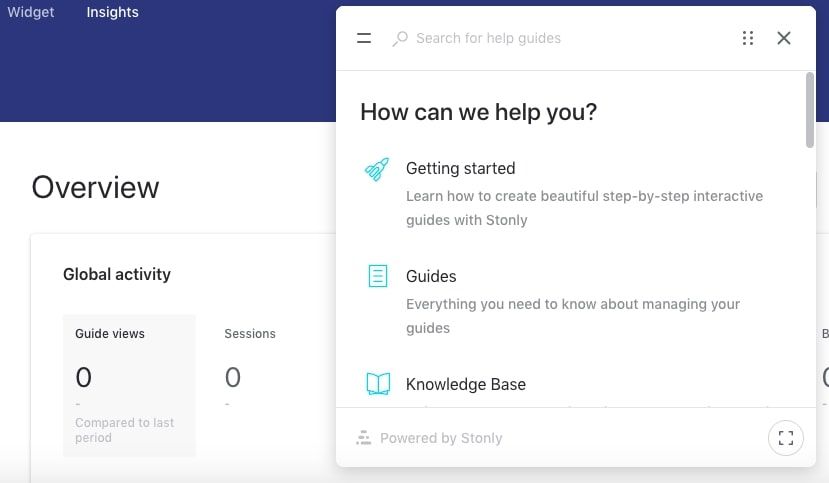
Knowledge base software lets you embed help center articles and guides directly in your product. Customers access answers without opening a new tab or leaving their workflow.
They click a help widget, search for their issue, and find the solution on the same page where the problem occurred.
5. Improve customer satisfaction and reduce churn
88 percent of consumers say they expect companies to offer self-service support options. Customers look for your knowledge base when they need help. If they don't find one, they get frustrated.
That frustration damages their experience and increases the likelihood they'll switch to a competitor.
6. Collect customer insights
Knowledge bases show you what issues customers face most often, which search terms they use, and which articles resolve their problems.
This data helps you improve your product and identify content gaps. For example, if 500 customers search "API timeout error" but your knowledge base has no article on that topic, you know exactly what content to create next.
Internal vs External Knowledge Bases for Customer Support
Many companies need both internal and external knowledge bases for customer support:
- External knowledge bases provide customer-facing self-service support. They're either publicly accessible or gated behind customer logins, focusing on product usage, troubleshooting, and how-to instructions. These self-service knowledge bases are typically optimized for SEO, and they're written for a non-technical audience.
- Internal knowledge bases equip support agents with the information they need to help customers effectively. This includes training materials for new agents, support processes and best practices, advanced troubleshooting workflows, and scripts or macros for common responses. Internal content can be more technical since the audience has product expertise.
Some knowledge base software platforms let you manage both types in a single system with access controls that determine who sees what. This prevents content duplication and makes it easier to maintain consistency between what agents know and what external customers can discover independently.
A hybrid approach works well for some teams. Content often starts as internal agent scripts or troubleshooting workflows. Once you validate the process and refine the language, you adapt it into customer-facing articles. This ensures your external content reflects proven solutions rather than theoretical fixes.
Building Your Knowledge Base: Step-by-Step
A knowledge base is a customer service tool at its core, but building one requires contributions from several departments across your company. You’ll need customer insights from the support team and specialized knowledge from the product/engineering team.
It’s easier to get going once you start, so here’s a seven-step guide detailing everything you need to do:
- Assign an owner
- Make a list of common customer queries/pain points
- Choose your knowledge base software
- Create an outline of your knowledge base
- Determine your first five articles and start writing
- Launch your customer service knowledge base
- Put your knowledge base where users need it
Step 1: Assign an owner
Select someone to take charge of creating the knowledge base and updating the content as needed. For this role, you want someone with organizational skills and product knowledge, someone who excels at collaborating with their coworkers. Since the support team handles the day-to-day issues customers face, often someone from that department will be the owner.
The owner will be required to interface with other workers and find contributors with the necessary expertise to create detailed guides. If you’re reading this post, then you may be the person to take ownership of your company’s knowledge base.
Common mistakes to avoid
- Don’t restrict your search to the support team. It's most important to find somebody collaborative who understands customer pain points and can find the answers.
- Don’t take on everything yourself! If your company needs an extensive knowledge base, you may need to create a team of co-owners, perhaps with domain over different product areas.
Step 2: Make a list of common customer queries/pain points
For this step, you’ll need to create a list of issues customers struggle with constantly. You may already have a good idea of where to start, but there are a few places to look if you need ideas:
- Ask support leaders and team members which topics people ask about most often.
- Check your support ticketing system to identify high ticket volume issues.
- If you already have an FAQ, determine which answers require articles.
Create a document, list these topics, and arrange them in order of importance. After you’ve collected common customer issues, refer to internal documentation to come up with answers. If needed, talk to subject matter experts (SMEs) who can provide a complete solution.
Related Post: Internal Knowledge Base: What, Why, and How? [Definitive Guide]
Common mistakes to avoid
- Don’t overlook “small” issues. No user pain point is too straightforward to address. If a good number of your customers are opening tickets to solve a problem, no matter how simple you think it is, you have to create a knowledge base article that addresses it.
- Don’t forget to ask your social media team about common customer pain points. They’re immersed in customer feedback daily and will know what problems people are facing.
- Don’t obsess over getting this initial list perfect. Choose your first few topics, and keep moving. Your knowledge base will grow and evolve alongside your company.
Step 3: Choose your knowledge base software
Knowledge base software makes it easy to create, publish, and distribute customer support content. It also provides a means to update the content and add new guides as your company builds more products.
Some modern features we recommend you look out for:
- A no-code editor that lets you create clear, step-by-step guides that help your users solve problems on their own.
- An integrated search bar that simplifies navigation and helps customers find the articles they need.
- Reporting and analytics to measure knowledge base performance and identify areas for improvement.
- Widget functionality to place help center articles where customers need them most.
If you're looking for a knowledge base tool that offers these key features and more, here's why we think you should consider Stonly:
1. You can create the absolute most effective knowledge for customer support
Stonly is the only full-featured knowledge base that supports both standard articles and interactive guides, a format that breaks down troubleshooting steps, processes, and how-to content into adaptive paths. Each guide adjusts based on the reader's situation to deliver the specific information they need.
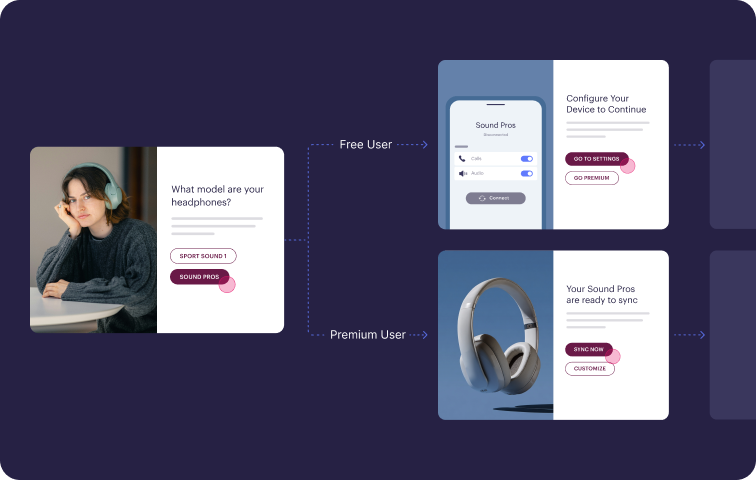
Interactive guides also automate actions on behalf of customers and agents, so your knowledge becomes a more active part of resolving customer issues.
2. It makes it easy for people to find and use your knowledge
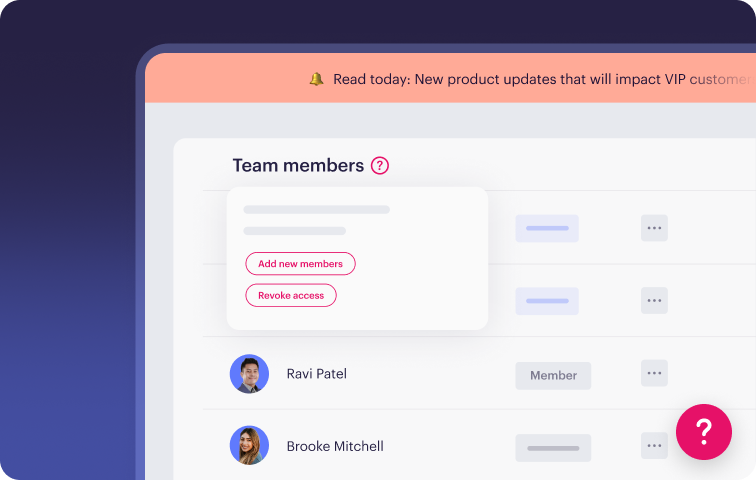
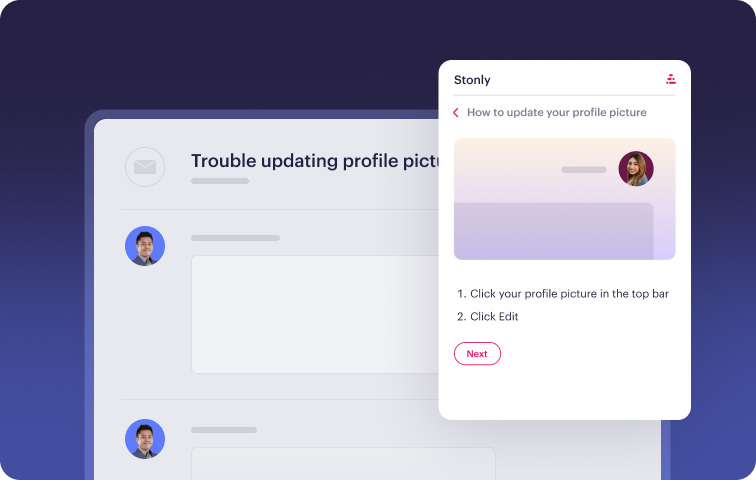
The platform focuses on removing friction in how people access knowledge. Agents see relevant guidance directly in their ticketing system without needing to search separately. Customers get help content through widgets, banners, and tooltips placed in the applications they're already using.
3. Our knowledge makes your AI work better (whether you use Stonly AI or have your own solution)
Stonly's AI works in two ways: as a customer-facing self-service tool and as an agent copilot inside ticketing systems. The chatbot combines keyword and semantic search, rewrites unclear questions automatically, and asks follow-up questions.
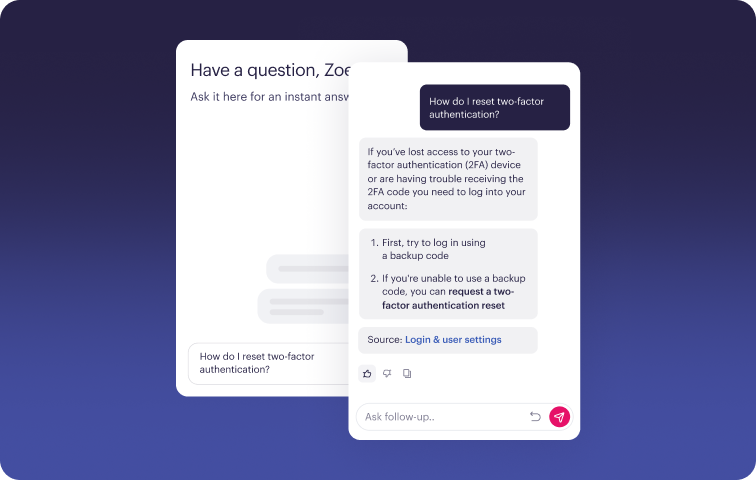
The agent copilot surfaces relevant articles during ticket handling and can execute actions in connected systems. Together, they create a comprehensive AI-powered knowledge base.
4. You get access to a level of service that is unmatched in the knowledge management space
The platform is easy and intuitive, and you also get access to a team of CSMs who have helped 1000+ companies make a significant impact with their knowledge. We’re a partner in helping you achieve the success you need, not just a cheap self-serve tool.
Go here to get a demo of Stonly.
Step 4: Create an outline of your knowledge base
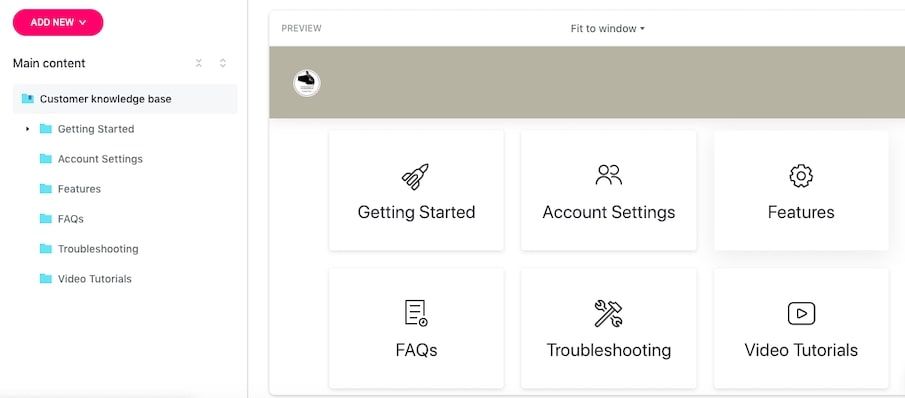
How will the homepage of your knowledge base look? How many folders will you have? What would these folders address? Do you want to include a few featured guides? An outline answers these questions, and you need to build one before you start writing articles or creating guides.
With Stonly, you can easily add new folders to your homepage, and there’s a preview showing how the layout looks as you build. Ideally, you should have folders to help users get started, set up an account, and troubleshoot common issues.
Common mistakes to avoid
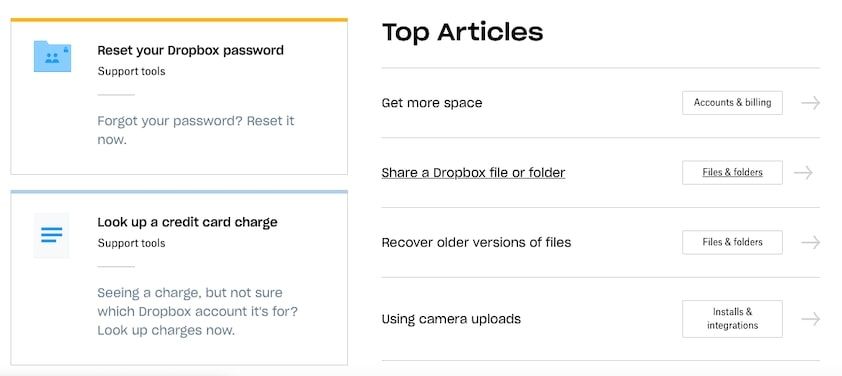
- Don’t clutter your homepage with too many folders. Create broad categories and place articles and guides into relevant sections. Customers will open the folders that correspond to the problem they want to solve.
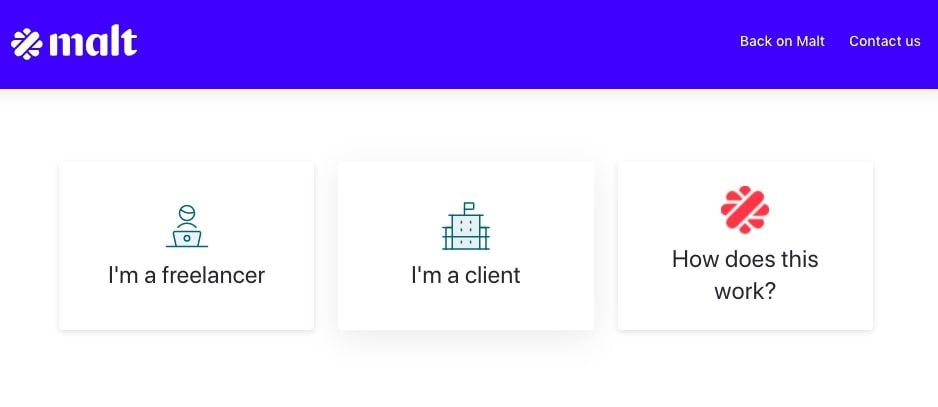
- If you have distinct customer segments, don’t miss the opportunity to create separate sections for them. See how Malt segmented its knowledge base below:
Step 5: Determine your first five articles and start writing
Since you already have a list of common customer pain points, you can now decide on the first articles to write. Look through the list you created in step two, and pick five problems customers face frequently. Focus on issues that are self-servable, meaning customers can follow a step-by-step guide to resolve them.
After selecting your first five, you can start creating the content.
Common mistakes to avoid
- Don’t forget to use lists, bullet points, callouts, screenshots, and GIFs to make the steps easier to follow.
- Try taking the steps you’re describing as you write the articles. This ensures you don’t miss any steps, and along the way, you can collect images/GIFs to attach to the guide. Missed steps make it difficult for users to follow your lead and self-serve.
Step 6: Launch your knowledge base
You can launch your knowledge base once the first set of articles are complete. Place a link to it on the header and footer sections of your website; those are the first places users check when looking for self-service tools.
Most companies use the name “Help Center” to describe their customer-facing knowledge base, and they place it under “Support” or “Resources.” It may be practical to do the same.
Common mistakes to avoid
- Don’t wait until you have a comprehensive knowledge base to launch. Start small: a small knowledge base is better than none.
Step 7: Put your knowledge base where users need it
Beyond the header and footer sections of your site, modern knowledge base tools make it possible to provide your help center in context. You can place your knowledge base on your website, in-app, and anywhere users may need it. This is another advantage of using a solution like Stonly, which lets you choose which sections of the knowledge base appear on which pages.
As a result, if a user runs into a problem while using your product, they can click on the “Help” or “?” widget and find help center articles related to the exact problem they’re facing. This makes self-service intuitive and more personal to each user.
Common mistakes to avoid
- Offer your knowledge base before customers contact support. It’s often the fastest, easiest way for them to get an answer. Make it easy to find!
5 Advanced Strategies to Get More Out of Your Knowledge Base
Once your knowledge base is up and running, these tactics can help you improve discoverability, personalize the experience, and expand your reach.
Use AI to Enhance Your Knowledge Base
AI improves how people find and use your product knowledge. When search algorithms understand intent rather than just keywords, they can help users locate relevant articles even with imperfectly phrased queries. Instead of returning exact keyword matches, AI-powered search interprets what someone is trying to accomplish and surfaces the most helpful resources.
Chatbots can reference your knowledge base to answer questions conversationally. When someone asks a question, the bot retrieves relevant content and presents it in natural language rather than simply linking to articles. This makes the interaction feel more guided and personal, improving the overall customer experience.
Smart article suggestions deliver personalized recommendations based on user behavior. So, if someone views several articles about email configuration, AI might proactively suggest related topics like troubleshooting delivery issues or setting up filters.
AI can also identify content gaps by analyzing support tickets and search queries that don't return useful results. These insights show you which topics need new articles or where existing content falls short.
AI can even draft articles from support conversation transcripts or help you generate multiple variations of the same information for different audiences. These drafts always require human review and editing to ensure accuracy, but they speed up the writing process and help maintain consistency across large content libraries.
Keep in mind that AI enhances your knowledge base, but it doesn't replace the need for good content and structure. You still need clear writing, logical organization, and accurate information. AI makes great content easier to find and use, but it can't fix poorly written or incomplete articles.
Use Interactive Guides and Dynamic Knowledge Base Content
Static knowledge base articles present all information on a topic to every reader, forcing them to mentally filter what applies to their specific situation. For example, someone troubleshooting a login problem might have to read through sections for multiple user types, different operating systems, and various account configurations to find the steps relevant to them.
This approach fails when:
- Troubleshooting has multiple potential causes: A printer troubleshooting article might cover driver issues, connection problems, hardware failures, and permission settings. Most readers only need one of these paths.
- Processes differ by user type: Account setup for administrators looks completely different than setup for end users. Yet both groups might search for "how to create an account."
- Instructions vary by product tier or configuration: Premium subscribers have access to features that basic users don't. This makes one-size-fits-all content confusing or misleading.
Interactive guides solve these problems by adapting to each person's context. They present a series of questions where each answer determines what appears next.
Let’s say you’re building a troubleshooting guide. It might ask "Are you seeing an error message?" and branch to diagnostic steps for "Yes" or basic connectivity checks for "No." Each path progressively narrows until the reader reaches the exact solution they need.
This format works like a decision tree or choose-your-own-adventure book. Users only see information relevant to their specific path through the content.
Stonly pioneered this approach as the only full-featured knowledge base platform offering both standard articles and interactive guides within a single system. This gives you the flexibility to use the right content format for each situation: articles for straightforward topics and interactive guides for complex scenarios with multiple variables.
Implement Content-Level Personalization
Traditional knowledge bases show identical content to everyone, regardless of whether they're enterprise customers or free trial users, administrators, or end users. That forces everyone to figure out which information applies to them, creating friction in the user experience.
Personalization adapts what people see based on customer preferences and attributes like:
- Customer tier: Enterprise customers see advanced features and dedicated support options, while starter tier customers see basic functionality without mentions of unavailable features.
- Product version: Users on legacy versions see relevant troubleshooting and migration guidance, while users on current versions see up-to-date instructions without outdated references.
- User role: Administrators can access system configuration guides and user management documentation, while end users see simplified task instructions without administrative controls.
- Industry: Healthcare customers see compliance-focused content and HIPAA-related guidance, while retail customers see point-of-sale integration documentation.
The benefit is reduced cognitive load. Customers don't have to waste time reading irrelevant information or wondering whether something applies to them.
Implementing content-level personalization requires integration with your customer data or authentication system. Your knowledge base needs to identify who's accessing content and what attributes should determine their experience.
Here's an example of a self-service portal with content personalization: Stonly supports personalization at both the content level (showing specific sections within articles) and the knowledge base level (displaying different topic categories or entire content libraries).
Create Multilingual Content
Consider offering content in multiple languages when you serve customers across different regions, even if English is widely understood in your market. Native-language support is especially helpful for complex troubleshooting or technical instructions.
You can do this with several different approaches:
- Human translation produces the highest quality but requires investment. Professional translators understand nuance and cultural context that automated tools often miss. This works best for high-value content that directly impacts customer success or satisfaction.
- Machine translation through services like DeepL or Google Translate is fine for basic content. But it tends to struggle with technical terminology, idioms, and context-dependent meaning. The output requires careful review by native speakers before publishing.
- Native-speaking employees or contractors offer a middle ground. They understand your product and company voice while providing language expertise. Many companies hire bilingual support agents who translate content as a secondary responsibility.
The main challenge with multilingual content is maintenance and continuous improvement. Every update to source content must propagate to all language versions.
Without clear processes or guidelines, translated content drifts out of sync with the original. This creates confusion and leaves users with outdated information. And as you add more languages, regular updates become increasingly difficult to manage.
Start by identifying your top two or three languages by customer volume or revenue. Then, focus on translating your highest-traffic articles. Expand coverage gradually as you develop sustainable translation workflows.
Knowledge base software platforms like Stonly offer built-in translation management. These tools track which versions need updating when source content changes and integrate with translation services to simplify the workflow.
Build a Community-Driven Knowledge Base
Allowing customers to contribute articles or suggest edits can broaden coverage and surface solutions your support team hasn't encountered. This is especially useful when customers discover workarounds or use cases that internal team members miss, particularly for edge cases or creative product applications.
To start, try enabling comments or suggested corrections before accepting full article contributions.
This lets you gauge community engagement and quality while maintaining editorial control. Customers can flag outdated information, clarify confusing steps, or share additional context without you needing to moderate entirely new content.
If you move forward with accepting community articles, establish clear moderation rules and quality standards. Someone on your team must review every submission for accuracy, completeness, appropriate tone, and alignment with your documentation standards. Community content shouldn't feel noticeably different from official content in terms of quality or reliability.
When this approach works, it reduces the burden on your support team's time, provides faster coverage for emerging issues, and builds community through customer-to-customer support. The tradeoff is increased moderation overhead and potential quality inconsistency, even with solid review processes.
This approach works best for technical products with engaged user bases. Think developer tools, complex software platforms, or specialized professional applications. It's less effective for simple consumer products where the most common questions have straightforward answers.
Keep in mind that community contributions help most with long-tail topics that affect small user segments. Your core documentation should still come from internal subject matter experts who understand product strategy and can ensure consistency across related topics.
Comparing Different Knowledge Base Solutions Built for Customer Support
Now that we’ve covered what a customer support knowledge base is, how to create one, and some advanced strategies for delivering a great customer experience, you may also want to make sure you have the right tool for the job.
Check out this comparison article highlighting several of the top knowledge base tools for customer support. We compare the advantages and disadvantages of each tool and compare them head-to-head so you can find the one that has the features you’re looking for.