

Call center agents handle dozens of different issue types in a single day, and the steps for resolving each one rarely fit on a single screen or a single script. When agents have to piece together the right path from scattered articles, tribal knowledge, and outdated PDFs, calls take longer, answers vary, and customers get bounced between reps.
Decision trees solve this by walking agents through resolutions one step at a time, branching based on the customer's situation. But how easy a tree is to use mid-call and how much work it takes to keep current vary widely across platforms.
Here are some of the biggest challenges support teams run into when adopting decision trees for the call center:
- Static flowcharts that don't fit the workflow: Visual decision tree diagrams in tools like Lucidchart or Visio look organized on paper, but agents can't navigate them in real time during a call.
- Decision trees that live outside the agent's console: When the guide is in a separate tab, agents toggle between systems instead of focusing on the customer, which drives up average handle time (AHT).
- Content that drifts from the rest of the knowledge base: Most teams end up with decision trees in one tool and knowledge base articles in another, and the two rarely stay in sync.
- Authoring tools built for engineers, not subject matter experts (SMEs): If only one person can build or update a tree, every change becomes a ticket and the content goes stale.
This article covers what decision trees help call center teams achieve, what to look for in a platform, and the top tools to consider when you're ready to roll them out.
What Is a Decision Tree in a Call Center Context?
A decision tree is an interactive branching guide that walks an agent through a resolution one question at a time. At each step, the agent answers a question or confirms a detail about the customer's situation, and the tree routes them to the next relevant step based on that answer. Instead of reading through a full document and deciding what applies, the agent only sees what they need right now.
Two other formats try to solve the same problem but break down in practice. A linear script gives the agent one fixed path to follow regardless of what the customer says, which can fall apart the moment the call goes off-script.
A static flowchart maps out every possible path visually but stays a reference diagram, not something agents can click through mid-call.
In a decision tree, each step leads to a new question or a resolution. For example:
Q: Is the charge from the last 30 days?
- Yes → Was it a subscription renewal?
- No → Route to escalation queue.
The agent never has to guess which step comes next.
Why Call Centers Use Decision Trees
Decision trees address a few recurring pain points in contact centers with high call volume, from long handle times to consistency issues that can hurt customer satisfaction.
- Faster resolutions: When agents don't have to dig through articles or rely on memory to find the right next step, calls move faster. Trees narrow the path in real time, so agents spend less time searching and more time resolving.
- More consistent outcomes: A tree applies the same logic to every customer interaction regardless of who responds, so a new hire can follow the same steps as a veteran. Variance across the team drops, and QA reviewers get a shared baseline to score against. Without a tree, one agent might waive a late fee as a courtesy while another on the same shift denies the same request, leaving the customer wondering why the answer depends on who picks up.
- Faster ramp time for new agents: New hires don't need to memorize every policy and process before taking calls. The decision tree walks them through each resolution, so they can handle complex scenarios earlier and build knowledge on the job.
- Built-in compliance: In regulated industries like financial services, healthcare, and insurance, decision trees can require agents to complete disclosures and verifications before moving forward. Locking in those steps helps reduce the risk of gaps during audits.
- Better QA visibility: Because trees can log each branch an agent takes, QA teams can trace the exact path a call followed. Pairing that data with customer feedback makes it easier to spot where agents get stuck and where content needs to be refined. If 40% of agents are selecting "escalate to supervisor" at step 3 of a billing tree, QA can investigate whether the instructions at that step are unclear or the policy itself needs revisiting.
Common Use Cases for Decision Trees in the Call Center
Decision trees work best when a call follows conditional logic that depends on the caller's specific situation. Below are the scenarios where call center teams get the most value out of building them.
Multi-Step Troubleshooting
Troubleshooting calls rarely follow a straight line. A customer reporting a connectivity issue could be dealing with a hardware failure, a configuration error, an ISP outage, or a dozen other root causes. Trying to document all of those pathways in a single knowledge article forces agents to scan, interpret, and skip around mid-call.
A decision tree replaces that mental work with a step-by-step guide. The agent confirms one detail, the tree eliminates branches that don't apply, and by the third or fourth question, the agent is usually down to one or two potential outcomes.
For example, if a customer calls about a router that won't connect, the tree might branch like this:
Q: Is the power light on?
- No → Walk through power cycle steps.
- Yes → Q: Is the internet light solid or blinking?
- Solid → Run a connection test (likely a line issue).
- Blinking → Escalate to Tier 2 (likely an ISP signal issue).
Returns, Refunds, and Exchanges
Return policies look simple on paper, but play out differently on every call. Whether a customer qualifies for a full refund, a store credit, or an exchange can depend on half a dozen variables. Time since purchase, payment method, item condition, and loyalty tier all play a role.
A tree turns that policy variation into a guided conversation. The agent answers a series of questions about the customer's situation, and the decision tree routes to the correct outcome. The tree can also prompt the agent to offer a replacement or upgrade at the right moment, which is easy to forget when the focus is on processing a return.
Fraud and Dispute Investigations
Fraud calls are high-stakes and procedurally rigid. The agent needs to collect evidence in the right order, ask the right follow-up questions based on the type of dispute, and document everything in a format that holds up during a chargeback review. Missing a single step can weaken the case.
A decision tree locks in that sequence. It guides the agent through each required question, captures responses in a structured format, and flags when a case needs to be escalated. For teams that handle chargebacks or operate under regulatory scrutiny, the documentation trail alone can justify building the tree.
Account Cancellations and Retention
Retention calls have a narrow window. The agent needs to understand why the customer wants to cancel, match that reason to the right save offer, and deliver it before the customer checks out of the conversation. When agents wing it, they can end up either overwhelming the customer with options or skipping retention entirely.
A decision tree structures the flow around the customer's reason for leaving. If they're canceling over price, the tree can surface a discount or plan downgrade. If they're leaving for a competitor, it can prompt a feature comparison. The conversation stays focused, and the agent doesn't have to improvise.
Regulated Verifications and Disclosures
In industries like financial services, healthcare, and insurance, certain steps on a call aren't optional. Identity verification, required disclosures, and consent collection all need to happen in the right order. Skipping one can create legal exposure.
Decision trees are well-suited here because they can gate progression. The agent can't move to the next step until the required action is complete, which removes the possibility of a shortcut. For compliance teams, this can mean fewer audit findings and a clearer paper trail when regulators come asking.
Escalation and Routing Decisions
Not every call needs a full resolution tree. Sometimes the most valuable decision tree is a short triage flow at the start of a call that routes the customer to the right team. A few branching questions about the issue type, account status, or urgency level can get the caller to the right specialist on the first transfer. A quick triage tree might look like this:
Q: Is this a billing issue?
- Yes → Q: Is the customer disputing a charge over $500?
- Yes → Route to fraud team.
- No → Route to billing support.
- No → Q: Is the customer reporting a service outage?
- Yes → Route to technical support.
- No → Continue to general intake.
This cuts down on unnecessary escalations and improves resource allocation across the team.
With a use case or two in mind, the platform choice hinges on whether you also need a knowledge base, customer self-service, or AI capabilities alongside your trees.
The Top Decision Tree Platforms for Call Centers
Here's a quick look at the five platforms covered below: Stonly, Zingtree, Yonyx, Knowmax, and ScreenSteps.
| Platform | Best For |
| Stonly | Interactive decision trees, a full knowledge base, customer-facing self-service, and AI that executes workflows (not just retrieves articles) inside the tools support agents already use |
| Zingtree | Governed, AI-powered workflow automation with strong compliance controls for high-stakes, complex support scenarios |
| Yonyx | CRM-integrated decision trees with in-node data capture, call scripting, and detailed path analytics |
| Knowmax | A full knowledge management platform with decision trees, visual device guides, and AI-powered search across multiple support channels |
| ScreenSteps | SOP-driven workflows and agent onboarding, with a browser extension that surfaces guidance inside any application |
Stonly
Stonly is a call center knowledge management platform built for high-volume customer service teams that need one system for both structured workflows and broader knowledge. It combines a full knowledge base with interactive, branching decision trees. Support teams can handle everything from simple FAQs to complex customer issues in one place for both internal and external users.
Stonly brings a few advantages for call center teams.
A complete knowledge platform, not just decision trees
A dedicated decision tree tool can handle branching logic well, but it typically means maintaining a separate knowledge base for everything else. Stonly supports standard articles, interactive guides, checklists, and branching trees that all connect and reference each other within one system.
Teams can create content once and reuse it across agent workflows and customer-facing self-service. There's no duplication and no drift between systems.
Built for both agents and customers
The same knowledge base powers both sides of the support experience within Stonly. Customers find answers through self-service options like an interactive help center with AI-powered search and a generative AI chatbot trained on your content.
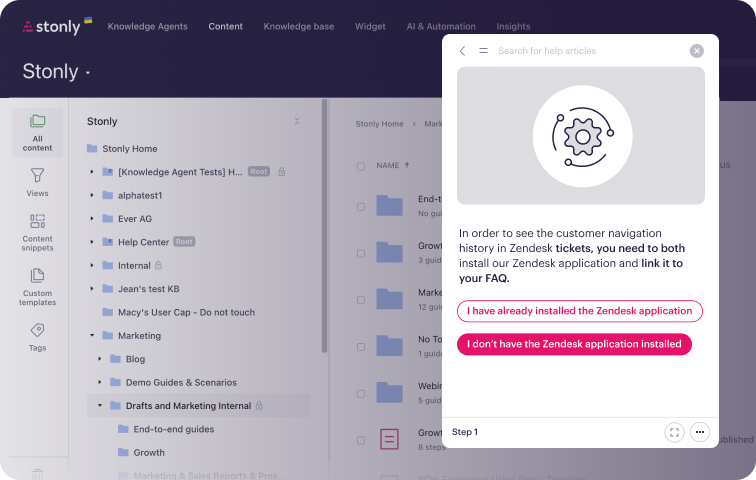
Agents access guided decision trees directly inside their ticketing system. When you update content, it changes everywhere at once.
Guidance embedded in the workflow, not alongside it
Stonly's Zendesk, Salesforce, and Freshdesk integrations work at the ticket level. The platform can pull data from the ticket to skip to the right step in a tree, then push data back to fill in fields or trigger macros without the agent doing it manually.
Built for subject matter experts
Teams have an easier time keeping trees accurate when there are fewer bottlenecks between a process change and a content update. Stonly's content editor lets team leads, trainers, and SMEs create and update decision trees without filing a ticket with engineering. The visual editor makes authoring fast, and the finished guides look clean and intuitive for agents and customers.
See how teams use Stonly to power their call center decision trees. Get a Stonly demo.
Zingtree
Zingtree is a workflow automation platform built around decision trees and agent scripting for complex, compliance-heavy support scenarios. It has AI features with built-in guardrails designed to prevent hallucination in regulated environments, and it integrates with tools like Zendesk and Salesforce.
The platform offers customer self-service alongside agent assistance, but it's not a full knowledge base platform. Teams that need standard articles or a broader help center may need a second system alongside it or a broader alternative.
Yonyx
Yonyx is an interactive decision tree platform with CRM integration and built-in data capture. It's a common choice for business process outsourcing (BPO) and outsourced support environments. Yonyx supports call flow scripting, troubleshooting guides, and conditional logic paths, connecting with systems like Salesforce and Zoho to read and write data directly from tree nodes.
The platform offers detailed analytics on how agents navigate each tree, which can help identify where calls stall or scripts need refinement. But it's primarily a decision tree tool. Teams that need a full knowledge base or customer-facing self-service will likely need a separate platform.
Knowmax
Knowmax is an AI-powered knowledge management platform designed for enterprise contact centers. It includes a knowledge base, decision trees, visual device guides, and a learning management system. Knowmax integrates with tools like Genesys, Salesforce, Zendesk, and Freshchat.
The platform covers more ground than a standalone decision tree tool, with AI-powered search and multi-channel delivery across contact center, self-service, and field service use cases. Because of the platform's wide scope and long feature list, Knowmax often requires a longer implementation and more training time to get teams up to speed.
ScreenSteps
ScreenSteps is an agent enablement platform focused on training, onboarding, and on-the-job guidance. Its core methodology trains agents to quickly locate the right procedure and follow it to completion. A browser extension brings that guidance into whatever application the agent is already working in.
The platform is strong for teams that want to standardize how employees follow processes, especially during ramp-up. It's less focused on customer-facing self-service or interactive decision trees and more on making sure agents can find and follow the right standard operating procedure (SOP) at the right time.
Which Decision Tree Platform Should You Choose?
The right pick depends on what your team needs beyond decision trees. If your team already has a knowledge management system and only needs branching logic for agent scripts, a focused tool like Zingtree or Yonyx might be enough.
If you need decision trees, a knowledge base, and customer self-service in one system, Stonly is the most complete option. Running those capabilities in separate tools can create content drift and extra maintenance. The gap between what agents see and what customers see can widen over time.
If agent training and onboarding are priorities, ScreenSteps might be worth evaluating. And if you want a broader enterprise contact center platform with decision trees, Knowmax tends to come up.